Thursday, February 10, 2011

How to Set-Up Your iGoogle Page: A "Tutorial Thursday" Post

If you read several blogs, you may benefit from setting up an iGoogle page.  What is an iGoogle page? An iGoogle page (your very own) allows you to follow all your favorite blogs on ONE page, in ONE place.  Super-handy. It has been a true time and sanity saver for me!

A Screenshot of My iGoogle page. Click to enlarge,
then use your back button to return to the blog post
(notice there are more blogs  below the fold).
I set up my iGoogle page in 2005.  My personal iGoogle page has evolved over the years (I’ve added and removed blogs as my interests have changed).  I’m sure there are new and neat features that I haven’t discovered yet.  I use it to read my fave blogs in one place. On this "Tutorial Thursday", I'm sharing a tutorial on setting up your customized iGoogle page…it’s worth the time to set-up and only takes a few minutes!

How To Set Up Your iGoogle Page
  1. Visit iGoogle.com
  2. Click on “Sign In” (on the top right-hand side of the page).  You’ll follow this step even if you don’t have an iGoogle account yet.
  3. Sign in.  For those who do not have an iGoogle account, create one by clicking on “Create Account Now” below the sign-in box. It’s just a few simple steps and you can use an existing email address!
  4. Click on “Add Stuff” towards the top right-hand side of the iGoogle page after you’ve signed in.
  5. Click on “Add Feed or Gadget”
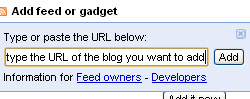
  6. A text box will appear for you to paste the URL (address) of the blog you’d like to add to your page.  For example, paste this blog address in the field: http://strategiconlinemarketing.blogspot.com.
  7. Click “Add”.  Just below the box, a confirmation will appear when the add is successful.
  8. Continue adding the URLs for the many blogs you’d like to follow.  You will need to add them one at a time, but it only takes a second.
  9. Click on “Back to iGoogle Home” (top left-hand side of the page) after you’ve added the blogs you wish to follow.
A Few Other iGoogle Tips…
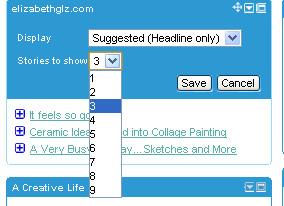
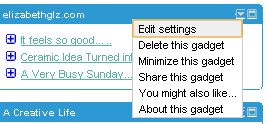
1. You can “edit” the “settings” of each of the blog feeds on your iGoogle page.  This comes in handy when you wish to set how many of the blog’s recent posts you wish to see.  You may wish to view 3 posts at a time, or maybe even 5 (or more).  I have mine set at 3. To do this, click on the arrow at the top right-hand side of one of the boxes on your iGoogle page.  Click on “edit settings”.  Select the number of posts you’d like displayed from the drop-down that appears.

2. You can re-arrange the boxes that appear for each of the blogs you follow.  To do this, click on along the top bar (on one of the boxes).  You should see an icon appear that looks like 4 arrows.  Hold down and drag. 
3. There are plenty of widgets you can add to your iGoogle page besides blogs…click on the same “add stuff” link on your iGoogle page to browse a variety of other widgets (weather, jokes of the day, quotes, etc.)

Laura Catherine Otero is a marketing professional and blogger in Charleston, SC who has been active in social media since 2005.  If you enjoyed this post, please consider subscribing to this blog via Email or  RSS. Laura can also be found on Twitter (@LauraCatherineO), Facebook, and LinkedIn. 

Wednesday, February 9, 2011

Get Focused with Focus Groups

Our team just completed a week-long series of focus groups in Mississippi. We talked to both customers and prospects for a client in 3 different markets.

If you've never done focus groups before, they can be awfully handy! They allow you to dig into specific subjects in a way that you simply can't duplicate with quantitative research.

Do you want to know why someone chooses a checking account or who they'd go to first for a loan? What about price versus service? Would your market be willing to pay 10 basis points for the absolute best service in town? Great ... now how do they DEFINE service?!?! You can find it all out with focus groups.

Here area few tips:
  • Conduct groups in all relevant markets. You'll likely find that perceptions and purchase criteria are different from market-to-market (and if they're consistent, that tells us something too!)
  • Talk to both customers and prospects. Your customers will give you great insight into their experiences with you. Prospects can tell you why they're not currently banking with you.
  • Be very targeted in what you want to learn. Identify 3-4 things that you MUST learn from the session and 2-3 other items that would be nice.
  • Be very targeted in who you want to learn from. Do you need to focus efforts on a specific demographic? Recruit them. Want to learn what a specific competitor's customers think? Recruit them. Just note that the more narrow your target, the more expensive recruiting will likely be.
  • Stay consistent. use a professional facilitator who can keep each session consistent so you can use data across all your markets.
Take care,
Eric

Tuesday, February 8, 2011

Join us for Google’s Think Mobile Event Live Stream

The rise of the mobile web is driving one of the most dramatic consumer behavior transformations in history. Billions of people are using their smartphones to search for information, consume news, watch videos, interact through social networks, and engage with advertising every day. So what does this mean for mobile marketing?

Tune in and find out what Mary Meeker, Partner at Kleiner Perkins, and Google’s Dennis Woodside, SVP of Americas Operations, and Jason Spero, Head of Americas Mobile Advertising, have to say about the future of mobile and what marketers can do to better connect with the mobilized, modern consumer.

The live stream will start on February 10, 2011, at 1:05 pm EST, and you’ll be able to watch from your desktop computer or mobile device. Please register for this virtual event by visiting the Think Mobile Live Stream page.

Following us on Twitter? Use the #thinkmobile hashtag as you're watching the event.


More control and flexibility with the new Billing tab (UK only)

We're announcing the launch of our new Billing tab in the UK. Based on your feedback, we upgraded the tab to give you more control over when and how much you're charged with the new 'Make a payment' functionality. Those of you on automatic payments get charged whenever you reach your billing threshold on or after 30 days, but in addition to that, you can now make manual payments to delay the automatic charge. Although some of you already have the new Billing tab in your accounts, we'll be rolling it out to all advertisers in the coming months. The upgrade doesn't require any action from you - your billing method and form of payment will stay the same.

Now, on to the improvements. What can you expect from your updated Billing tab?

  • Get more control. Choose to initiate a payment to your account at any time and use any form of payment available with your country and currency settings.
  • Make payments directly from your billing summary page. You can do this by clicking the "Make a payment" button.
  • Switch between automatic and manual payments. You now have the option to use either one.
  • Add multiple forms of payments and switch between them. Add as many forms of payment as you want to your account and switch between using them at any time.
  • Use different business and billing addresses. Your business address doesn't have to match your billing address. Plus, each form of payment can have a different billing address.
  • Access improved help content. There will be improved help content in the new Billing tab and Help Centre.

In addition, the below changes in terminology will be reflected in your upgraded Billing tab. But keep in mind that despite the name changes, these billing methods will function the same as they did previously.

  • Postpay is now called "automatic payments." We'll automatically charge you only after your ads accrue costs.
  • Prepay is now called "manual payments." You can make payments to your account whenever and in whatever amount you like. Your ad costs draw from those funds.
  • Direct debit is now called "bank account." Your funds will be debited from your bank account.
  • Bank transfer is now called "funds transfer." You can make payments by transferring funds to Google's bank account.

For more information on the new Billing tab, please visit the FAQ in the AdWords Help Centre.

The #Superbowl on Twitter: A "Twitter Tuesday" Post

I’m not much of a sports fan.  In fact, I don’t always remember to watch the Superbowl.  Gasp. I remember one year my sister and I went out to dinner during the Superbowl.  We couldn’t figure out why *no one* was at the restaurant.  Yep. That was us. I digress!

I was fascinated by the #Superbowl tweets this year.  My friend Alesya did an awesome job of tweeting about the Superbowl commercials.  I decided to tune in to the Superbowl and pay close attention to Twitter after I noticed her tweets.  Thanks, Alesya. I needed that!  


Five #Superbowl Twitter Observations…

  1. Something small but still fun…I loved that Twitter created a football icon that displayed each time the Superbowl hashtag (#Superbowl) was tweeted (see the football above).
  2.  I loved the excitement and “conversation” that was taking place all around the world, about the same topic.  This happens *all the time* on Twitter.  It’s one of the (many) reasons Twitter is amazing.
  3. In fact, I retweeted a few #Superbowl tweets from people I don’t follow or tweet with.  I checked their profiles out first, and am now tweeting with some new and interesting folks I wouldn’t have otherwise connected with.  
  4. Twitter made the #Superbowl interactive and interesting for those of us who aren’t huge sports fans. Just sayin’.
  5. VISA NFL was a promoted tweeter (paid advertiser) on Twitter during the #Superbowl.  What does this mean? Their tweets appeared at the top of the #Superbowl tweetstream.  See below. 

Did you tweet and watch the #Superbowl at the same time? Or, like me, did you tweet, watch the superbowl, write 3 blog posts, watch Youtube videos, check email, and work during the #Superbowl?  I’m sure I’m not the only one who multi-tasked!

Laura Catherine Otero is a marketing professional and blogger in Charleston, SC who has been active in social media since 2005.  If you enjoyed this post, please consider subscribing to this blog via Email or  RSS. Laura can also be found on Twitter (@LauraCatherineO), Facebook, and LinkedIn. 

Monday, February 7, 2011

Live online course on ‘Top Tips, Tools and Techniques for AdWords bidding and budgeting’

This week's tutorial on the AdWords Online Classroom (UK) will cover all things bidding and budgeting-related to help you maximize return on your advertising spend and make the most of your AdWords account in 2011!

Are you getting the most out of your target market? Are you appearing on the first page of Google? Are you losing conversions due to budget? If you’re not sure then we’d highly recommend you tune in as we’ll be discussing impression share, first page bids and how to get the most out of your budget. We’ll also cover ‘Burst Strategy’, helping you to ‘burst’ through the auction at the right time, and how to ensure your account is structured for success.

This live course is presented by AdWords Specialists and is appropriate for all advertisers wanting to maximize return on ad spend. It will take place on Wednesday, February 9th, 3pm - 4pm GMT, 7am-8am PST.

If you’re interested, make sure to sign up now!

Social Media Isn’t Just for People – Ducks and Dinosaurs Do It Too


The week of February 7-11, 2011, is Social Media Week around the world. So, in honor of Social Media Week, it’s a good time to see who participates as well as evaluate the impact of these users.

While the mainstream media gives the impression that celebrities including Ashton Kutcher, Lady Gaga, and the Kardashians set the tone for social media, that isn’t accurate. The amazing thing about social media is that anyone can set the tone – he or she doesn’t need a million fans or followers. Individuals who promote their personal brands or specialty areas and companies who promote their products or services set the tone. From Twitter to Facebook to YouTube to Flickr to Quora to del.icio.us to LinkedIn, anyone can share content or photos or video – and become an overnight sensation.

Television can be referred to as social media 1.0 because companies promote their brands with commercials and event sponsorships. Consider Geico insurance, Energizer batteries, Travelocity, Michelin tires, and Aflac insurance. These companies appear on a regular basis on television. Consumers recognize the brands and purchase the products. They identify with the brands and make the decision to become brand-loyal consumers or purchase similar products from competitors.

Enter Twitter and Facebook, which I call social media 2.0. Thanks to these two websites, consumers now have an opportunity to communicate with these companies in a much more personal level than ever before. Of course, in the past, people called a company’s toll-free number and waited on hold (on ignore) forever. But, due to Twitter and Facebook, customers can voice their complaints and positive experiences in real-time 24/7/365 – and resolve whatever issue is pending. And if an issue is not resolved, the world can and will hear about it immediately.

Another unique marketing result of social media 2.0 is that companies just don’t assign everyday employees to be their voices. Creativity is the name of the game with social media. Consider these product representatives: the Geico Gecko, the Energizer Bunny, Travelocity’s Roaming Gnome, the Michelin Man, and the Aflac Duck – all of these brand icons have their own Twitter accounts and Facebook pages. Another interesting user of both Twitter and Facebook is Sue the T Rex, the largest and best preserved Tyrannosaurus Rex fossil currently residing at the Field Museum of Natural History in Chicago. By giving a voice to these icons, companies provide a way for customers to build relationships – and those relationships have the potential to create satisfied repeat customers.

So, does your company have a brand icon to engage new customers and retain existing customers in social media? If the answer is no, perhaps, it’s time to consider creating one.

Connect with these brand icons on Twitter and Facebook:

The Geico Gecko

http://www.twitter.com/TheGEICOGecko

http://www.facebook.com/thegeicogecko

Energizer Bunny

http://www.twitter.com/EnergizerBunny

http://www.facebook.com/EnergizerBunny

Travelocity Roaming Gnome

http://www.twitter.com/RoamingGnome

http://www.facebook.com/travelocity

Michelin Man

http://www.twitter.com/MichelinManUSA

http://www.facebook.com/MichelinMan?v=info

Aflac Duck

http://www.twitter.com/aflacduck

http://www.facebook.com/aflacduck

Sue the T Rex

http://www.twitter.com/SUEtheTrex

http://www.facebook.com/SueTheTrex