Showing posts with label Updates. Show all posts

Thursday, December 12, 2013

Just in time for the holidays — viewability across the Google Display Network

Even the jingliest, jolliest ad of the season can’t work its magic unless it gets seen. That has been the driving force behind a number of investments we’ve been making over the past year to make viewability (or whether an ad is actually visible on a page) a core part of our products. Offering improved insights, transparency and actionability, viewability is key for brand advertisers to get the most out of the web.

Today, we’re taking an important step towards this goal by making it possible to buy based on viewability — in real time — across the more than two million sites in the Google Display Network. Viewability was already available for reservations buys on the Google Display Network, now this solution is available in the auction on a CPM basis globally as well, across desktop, mobile and tablet.  In other words, you can now choose to pay for ONLY those impressions where your ad has a chance to be seen.

This new buying option is based on Active View, our MRC-accredited viewability measurement solution. Through an algorithmic review of publisher sites, our systems will show ads only in ad slots most likely to be viewable, and you only pay for the ones measured as viewable according to the IAB/3MS standard: 50% of the ad visible on the page for one second or longer. You will also see a report of how many viewable impressions you received for any given campaign, which can help make future campaigns even more effective.
As we’ve said before, making viewability a basis for buying, selling and measuring media can help transform the digital marketplace. With access to more meaningful metrics, brand advertisers can unleash their most creative campaigns, knowing they’ll have a chance to shine. And publishers will be able to more fairly value all of their inventory, not just those spots considered “above-the-fold.” We’ll continue to work with our partners in the months to come to make this a reality, and to ensure that every ad has a chance for its holiday wish to come true.

For more information, check out the help center to get started.

Posted by James Beser, Group Product Manager

Friday, December 6, 2013

Understanding Impact with Earned Actions in AdWords for video

For many video advertisers, the benefit of TrueView only begins with the first view. Just as an Honest Trailers link pinged to a friend can lead to several other video views, we see this viewership pattern with paid ad views as well – the initial view can catalyze a long chain of engagement with a brand.

Since these earned views are a major benefit of advertising on YouTube and the Google Display Network, we’re bringing new capabilities to AdWords for video to help you better measure viewer actions following your video ads. Formerly known as Follow-on Actions, these new reporting columns will show your Earned views, Earned view rate, Earned subscribers, Earned playlist additions, Earned likes and Earned shares, with additional columns rolling out over the next few weeks. So if you're an advertiser, you can see how many people stayed on your channel to watch more videos, subscribed to your channel, added your video to a playlist, or shared your video with a friend after watching a TrueView ad.

From looking at the last six months, we’ve seen over 6,000 campaigns generate at least one earned view as a result of every two paid views. And we know the YouTube audience isn’t shy about sharing brand content: 3 in 4 YouTube users agree “If there is a brand I love, I tend to tell everyone about it.” (Source: YouTube Insights Oct 2013)

Check out this video to see how Earned Action reporting helps you better understand the impact of your video advertising:
We have also simplified the Account Linking flow to make it easier to join an AdWords for video account with a YouTube channel and see the effect of TrueView advertising on growing your audience, through Earned subscribers and Earned shares.

So link your AdWords for video account with your YouTube channel, and take advantage of these new reporting columns today.

Posted by Luke Segars, Product Manager, YouTube Ad Effectiveness

Wednesday, December 4, 2013

3 Ways to Measure More Conversions Using Estimated Total Conversions

In October, we announced Estimated Total Conversions as a first step to providing you with a more holistic view of the conversions driven by AdWords. It is available to all advertisers who use AdWords conversion tracking. Estimated Total Conversions includes conversions you see today, such as online sales, as well as new conversion types like cross-device conversions and calls. Learn more

These insights are particularly important to understand because consumers are now constantly connected, using multiple devices throughout the day. In the next few weeks, this will be even more pronounced as people shop for holiday gifts. A recent holiday study shows that 84% of consumers who are likely to use a mobile or tablet device while shopping this holiday season, will start shopping on one device and finish on another.

We’re making it easier for advertisers to understand these consumer behaviors with new insights that are part of Estimated Total Conversions, a new column in AdWords.

Estimated Total Conversions includes cross-device conversions, which are also shown in a separate column to highlight their importance.

3 ways to use Estimated Total Conversions to improve business results

1. Take another look at your desktop/tablet bid. Once you see more conversions that can be attributed to AdWords, your total ROI from AdWords will change. Re-calculate your desktop/tablet cost-per-acquisition (CPA) based on these cross-device conversions. If your CPA has improved using this measure, you might want to look for opportunities where you may be able to increase position and volume by increasing your bids.

2. Capture the full value of mobile.  Many experienced search marketers are already using this data to make business decisions, by starting a test on campaigns that previously did not show on mobile.  Within a few weeks of showing ads on mobile devices, these advertisers started to see conversions they could not before -- those that started on a mobile phone and ended on another device. These insights led to important business decisions like adjusting mobile bids or shifting budget to reflect the new ROI of their keywords.

Amber Yeray, Digital Marketing Manager at EXPRESS, a national fashion retailer, has been working with her agency partner, RKG, to understand the new insights offered by Estimated Total Conversions.
“Cross-device conversions have shown that total estimated conversions are up 7%, with a 17% lift from mobile-initiated conversions. EXPRESS and search marketing agency partner, RKG, are now able to increase mobile bids for areas of the account that show the most impact from mobile -- driving more volume while remaining efficient.”
3. Spend only the most profitable dollar. The total value of your AdWords investment might change once you’re able to see more conversions. Whether it’s AdWords, other digital channels or offline media, think about investing your dollar into the most profitable channel possible.

Estimated Total Conversions provides new insights that may help you optimize bids and budgets to improve performance. Amit Shah, Vice President of Online, Mobile & Social at 1-800-Flowers, used the new insights that he gained to make more informed budget allocation decisions.
“After measuring cross-device conversions that began on a mobile device, we saw a 4% increase in total conversions measured in AdWords. With the full view offered by Estimated Total Conversions, we can correctly understand attribution across channels and make better decisions on achieving marginal spend optimization.”
These are just a few of the tips that we will continue to share as we hear feedback from you. Check out these best practices along with a walkthrough of Estimated Total Conversions in a recent webinar we hosted.

Posted by Jason Spero, Director of Global Performance Solutions

Monday, November 25, 2013

Google Trusted Stores expands and connects with AdWords

The holiday season is a time of the year when many of us spend hours finding the perfect gifts. It’s also a time when knowing that an online retailer is trustworthy is more important than ever. That’s where Google Trusted Stores comes in - we’re spreading holiday cheer by helping people find the best online stores and shop with confidence.

Google Trusted Stores is a free certification program to highlight retailers that offer a consistently great shopping experience. Qualifying merchants display a badge on their website, and Google stands behind these stores by offering $1,000 of free purchase protection. Since we introduced the program last year, we’ve been working hard to expand it, including launching a new integration with seller ratings on AdWords, updating the badge with more helpful information for shoppers, and broadening store participation around the world.

Shopper feedback powering seller ratings

Google Trusted Stores now helps to power seller ratings, which show on AdWords text ads as well as Product Listing Ads on Google Shopping. This integration provides shoppers with valuable information, while giving participating retailers a free and easy way to earn the ratings they deserve. Advertisers who display seller ratings on their ads typically see a boost in AdWords click-through rates, with higher ratings generally resulting in higher click-through rates.

Providing helpful information at shoppers’ fingertips

In the US, Google Trusted Stores now provides shoppers with an upgraded store performance summary that appears when they hover over the badge on a merchant’s website. The summary includes helpful returns, delivery, and customer support responsiveness metrics provided by StellaService, a company that objectively measures the customer service experience by shopping anonymously at online stores.

More confident shoppers fueling global expansion
Millions of people now see the Google Trusted Stores badge on retailer sites and in Google ads every day. In fact, we’ve more than tripled US store participation in the last year. Because shoppers value the badge, many of these stores are seeing sales growth. For instance, OnlineShoes measured a 4.2% sales increase from the Google Trusted Stores badge, and AutoAnything saw an increase of 5.2%.

Given the great shopper and retailer response in the US, we’ve started to expand Google Trusted Stores around the world. We recently introduced pilot programs in the UK, France, Germany, and Australia, each with a collection of excellent merchants such as Schuh (UK), Spartoo.com (France), PEARL (Germany), and Kogan (Australia). (Note - only shoppers located in a particular country will see the badge for that country.)

Learn more 
To learn more about the program, please visit our website. If you’re a US retailer, you can apply to become a Google Trusted Store. If you are a retailer outside the US, please let us know you’re interested here: UK, France, Germany, Australia.

Happy Holidays and Happy Shopping!

Posted by Brian Marquardt, Group Product Manager, Google Shopping 

Thursday, November 21, 2013

Better browsing, shortlists and 360° images on Google Shopping

With 89% of consumers planning to use the internet to help with holiday shopping this year, our elves have been hard at work improving Google Shopping to help them discover your products and connect with your store.

A new shopping experience on desktop, tablet and mobile
It’s easier than ever for users to browse and hone in on items they want to buy like cameras, ski jackets, and ice cream makers. They can quickly preview details like sizes, colors, description, and even if it’s available at a nearby local store. “Visually similar” results give shoppers suggestions if they’ve found something that’s almost perfect but not quite. Make sure your products shine by following our holiday tips.

Get on people’s shortlists

Shortlists help people keep track of products that catch their eye, compare them at a glance, and share ideas with friends and family. Shortlists now also stay at the top of the page while someone is browsing Google Shopping, so she can cross off items on her shopping list as she goes. When people add products to their shortlists, photos, price and detailed information are automatically saved, too -- so make sure your product feed is up-to-date and has all the necessary information that makes it easy for them to choose your store when they’re ready to buy.

360° views for more products
Sometimes it’s hard to imagine what an item actually looks like from the online picture. Now, for many items on Google Shopping, users can see a 360° view of the products. These interactive images bring users the in-store feeling of holding and touching a product. If you’re manufacturer or brand interested in displaying these rich images of your products on Google Shopping, please fill out this form.
We will continue to improve Google Shopping to help retailers of all sizes reach more customers not just during the holiday season, but all year long.

Posted by Karen Corby, Senior Product Manager, Google Shopping

Wednesday, November 13, 2013

Introducing the new Opportunities tab: find more ways to improve your AdWords performance

We launched the Opportunities tab in 2009 as your personal AdWords assistant, surfacing insights to help you improve your performance in AdWords. Today we’re announcing the new Opportunities tab. We've added several new opportunity types and made each easier to understand. Now the Opportunities tab is even better at answering the question, “What else can I do to improve my performance in AdWords?”
The new Opportunities tab

New high-impact opportunities

We've added several new opportunity types for more ways to improve your performance.

  • Convert more customers in your best locations: If your conversion rate differs across locations, you might see opportunities to increase your location bid adjustment where your conversion rate is high, or decrease your location bid adjustments where your conversion rate is low. 
  • Get more out of your existing budget: If you’re maxing out your budget, you might see opportunities to lower your bids to capture more clicks.
  • Be there more often than competitors: If your ads are being seen less frequently than other advertisers competing for the same traffic, you might see opportunities to be seen more frequently with bids to show more often than advertisers like you.
  • Show ads that are more relevant: If we spot an ad group with keywords related to lots of different themes, it's harder for you to show a highly relevant ad, so you might see opportunities to create new ad groups from existing keywords.
  • Reach more customers on closely related searches: If you're missing clicks on searches that are very similar to your existing keywords, you might see opportunities to broaden your keyword match types.
  • Be seen on the first page: If your ads are showing below the first page when users search on high-quality keywords, you might see opportunities to raise your bids to show ads on the first page. 

Pick your best opportunities

A totally new design makes it easier to decide which opportunities to implement. For each opportunity, you'll see a short summary under "What you can do” and the possible impact under “What you might get each week.” The opportunities you’ll see are tailored to your account and selected based on their possible impact to your performance.

More opportunities are just around the corner

Check the Opportunities tab often. Whether you optimize your campaign once a day or once a month, it's constantly working in the background to spot opportunities for you to improve. And we’ll be adding even more opportunity types over time.

To learn more about the Opportunities tab, please visit our AdWords Help Center.

Posted by Deepti Bhatnagar, Product Manager, AdWords

Tuesday, November 12, 2013

Say Hello to Calls as Conversions in AdWords

Recent research shows that 70% of mobile searchers have called a business directly from search results and that over 40 million calls from Google ads are made each month to advertisers around the world. It’s clear that calls are important to businesses -- and we want to help you measure them in AdWords.

We announced on October 1st that phone calls would soon be added as an important conversion type as part of AdWords. Starting today, phone calls from mobile click-to-call ads will be added to the regular Conversion columns, which enable them to be used with automated bidding solutions like Conversion Optimizer. These mobile call conversions are available in countries where Google forwarding numbers are available.1  In addition, calls made by customers from your mobile and desktop ads will be counted in your “Estimated Total Conversions,” a new column you can use to measure the full value you're getting from AdWords.

Calls as conversions are counted based on the aggregate number of calls generated by your ads and the duration of the phone calls. This is the same type of reporting that we have been providing on calls for several years.

Success with calls as conversions in AdWords

Businesses using AdWords have found that adding  phone numbers to their ads is an important way to connect with customers and drive incremental sales. Learn more.

Room & Board, a home furnishings retailer, uses call extensions and call conversions to track interest in their brand:
”Since we have implemented call extensions, we have seen nearly 30% of our total conversions come from phone calls. We want our customers to connect with us in the way they prefer. Call extensions and call conversions give us that ability and allow us to measure results at the same time."
Improve your performance with automated bidding

Previously, calls were counted in their own column called “Phone Call Conversions.” Now, call conversions from mobile ads are counted in the regular Conversion columns, so you can use free automated bidding tools like Target CPA to improve performance and save time.

Understand the full value of your advertising

Online ads can help drive conversions beyond a purchase made directly on your website. Adding calls to the Estimated Total Conversions column gives you a more holistic view of how your keywords drive those conversions, so you can set bids and budgets that more fully reflect the value you're getting from AdWords.

For a more in-depth product walkthrough of Estimated Total Conversions, calls as conversions, and a review of best practices, join us for a webinar tomorrow, November 13th at 10am PT. You can sign up here.

Posted by Anurag Agrawal, Product Manager, Calls


1 US, UK, Germany, France. Previously, these mobile conversions were in the “Phone Call Conversions” column

Thursday, November 7, 2013

Google Shopping now available in 8 new countries

Every day, users come to Google to search for products and connect with merchants to make their purchase. We continue to work hard to improve the shopping experience and starting today, users in Austria, Belgium, Denmark, Mexico, Norway, Poland, Sweden and Turkey will begin to see Product Listing Ads more frequently on their shopping-related queries. Product Listing Ads are highly relevant ads that include rich product information directly in the ad itself - which may include a product image, price, and merchant name.


Where you’ll see Product Listing Ads in these countries
Product Listing Ads will appear in a single unit on Google search results when we identify that a search query has commercial intent, and when we have enough relevant products to match that user's query. This unit will be labeled as ‘Sponsored’ and will initially occupy space on the right-hand side of the search results page, above text ads.

We look forward to continuing to build delightful shopping experiences for consumers and working closely with merchants around the world.

Posted by Santiago Andrigo, Product Manager, Google Shopping

Monday, November 4, 2013

Select a new, better performing campaign type for acquiring customers on Search and Display

People are always looking to connect with useful information in the moments that matter - whether searching on keywords related to a product or reading highly relevant content on websites beyond search. Starting today we’re offering a new way for advertisers to reach people as they visit Google and sites across the web: Search Network with Display Select.

Search Network with Display Select extends the reach of your search campaigns to the Google Display Network (GDN). The GDN reaches 90% of the global online audience (Comscore September 2013) and includes 2 million publisher sites, like weather.com. Upgrading existing search campaigns to Search Network with Display Select is easy. In a few steps and without extra work, you could gain 15% more customers* by showing your ads at the right moments across search and the web.
How is this different from the old campaign type? 

In addition to extending the reach of search campaigns, this new campaign type offers better results on the display network than the old Search & Display Networks campaign type.

Search Network with Display Select uses improved signals and methods of predicting when and where your ads are likely to perform best, and sets a higher bar for when to show them. That means your ads are more likely to be shown to a smaller number of prospective customers, who are more likely to be interested in your offerings. Compared to the old campaign type, initial tests show that advertisers, on average, could see a 35% higher click-through-rate, and a 35% lower cost-per-customer purchase on the display portion of their Search Network with Display Select campaigns.*
When to use the new Search Network with Display Select campaign type:
  1. If you’re running Search Network only campaigns, consider trying this new campaign type for additional high quality traffic with no extra management required. When you enable Search Networks with Display Select, your search ads will be eligible to appear on both Google and pages with relevant keywords across the web. The majority of your campaign will still run on search, with a boost of high-performing placements in display. 
  2. If you’re running a Search & Display Networks campaign, consider switching to Search Networks with Display Select for better ROI.*
If you currently run Search and Display campaigns separately, we recommend you keep them separate for greater bidding, budgeting and targeting flexibility.

Upgrading to Search Network with Display Select

Search Network with Display Select is now the best option for advertisers running ads across search and display within a single campaign. So starting today and over the next few weeks, we'll be removing the current Search & Display Networks campaign type in the AdWords interface, and we're encouraging advertisers to switch existing campaigns to Search Network with Display Select. We've created a quick workflow in the AdWords interface that makes switching easy. Step-by-step instructions are also available in the AdWords Help Center. Please visit here to learn more.

Posted by Ahmad Anvari, Product Manager

*Based on initial test results, the average customer could see a 35% higher click-thru-rate and 35% lower CPA on the display portion of their new Search Networks with Display Select campaigns compared to existing Search & Display Networks campaigns.  Based on initial test results, the average customer could also see 10-15% incremental conversions compared with Search Network only campaigns. Individual campaign performance may vary.

Tuesday, October 22, 2013

Improving Ad Rank to show more relevant ad extensions and formats

When people use Google to research and buy things, they're interested in the most relevant and useful results. Ad extensions help by providing more information to potential customers and additional ways for them to respond. For example, they can call your business number, see your business location on a map, or choose an even more relevant landing page that you're promoting with sitelinks. Ad extensions typically improve clickthrough rate and overall campaign performance because they make ads more useful.

Today, we're announcing improvements in the AdWords auction that let us more consistently show more relevant ad extensions and formats.

Ad Rank improvements

Our system for ordering ads on search results pages uses a calculation called Ad Rank. Previously, Ad Rank was calculated using your max CPC bid and your Quality Score. With this update, Ad Rank will also take into account a third component: the expected impact from your ad extensions and formats. In addition, we've increased the importance of Ad Rank in determining whether your ad is eligible to be displayed with extensions and formats.

Here are some more details and implications of these changes:

  • Ad extensions and formats can now influence the position of your ad on the search results page. If two competing ads have the same bid and quality, then the ad with the more positive expected impact from extensions will generally appear in a higher position than the other.
  • When estimating the expected impact of extensions and ad formats, we consider such factors as the relevance, clickthrough rates, and the prominence of the extensions or formats on the search results page.
  • Because Ad Rank is now more important in determining whether your ad is shown with extensions and formats, you might need to increase your Quality Score, bid, or both for extensions and formats to appear. 
  • In each auction, we'll generally show your highest performing and most useful combination of extensions and formats among those eligible. So there's no need to try to guess which extensions will help improve your clickthrough rate the most. 
  • You may see lower or higher average CPCs in your account. You may see lower CPCs if your extensions and formats are highly relevant, and we expect a large positive performance impact relative to other competitors in the auction. In other cases, you may see higher CPCs because of an improvement in ad position or increased competition from other ads with a high expected impact from formats.
  • For now, this update only affects search ads appearing on Google Search.

We've updated our Help Center articles on topics including ad extensions and how we rank ads to reflect these important changes.

Recommendations for using extensions

Extensions make your ads more useful and can improve your campaign performance. So you should add extensions that make sense for your business type and campaign goals. With these improvements to AdRank, our systems will do even more to automatically serve extensions in the contexts when they're most beneficial.

For example, consider someone downtown searching on a mobile phone for "auto repair." In this example, the user might be most likely to respond to your ad when they can click to call a phone number or tap a link to get directions to visit in person. So we may show a combination of call and location extensions with your mobile search ad.

Now imagine if someone were searching for "auto repair" on a laptop computer in the suburbs. Say your ad earned the 3rd ad position above the organic results in this auction. We might show your seller rating and sitelinks because that's the highest performing and most useful combination of extensions that could be shown with your ad in this particular auction and ad position.

We're always looking for ways to make ads more relevant to a user's intent and context. After months of testing, we're confident that these AdRank changes help achieve that goal by more consistently showing people the most useful combination of extensions and formats.

Posted by Chris Roat, Staff Software Engineer

Introducing Shopping campaigns: a better way to promote your products on Google

Everyday, people search on Google for the best products from retailers large and small. With Product Listing Ads (PLA) on Google Shopping, people can browse a wide selection of products, finding high-quality imagery and relevant product information like brand and price.

To make it easier for you to connect with these consumers and promote your products on Google, we’re introducing Shopping campaigns, a new campaign type for PLAs. Shopping campaigns streamline how you manage and bid on your products, report on your performance, and find opportunities to grow your traffic from Google.
Key benefits

1. Retail-centric way to manage your products

Shopping campaigns allow you to browse your product inventory directly in AdWords and create product groups for the items you want to bid on. For example, if you’re a fashion retailer, you’ll see what types of shoes are in your data feed and how many boots you can promote. You use the product attributes derived from your data feed such as Google product category, product type, brand, condition, item id and custom labels to organize your inventory into product groups. Custom labels are a new, structured way to tag your products in your data feed with attributes that matter to you, such as ‘margin’ to separate your high- and low-margin products. To see all the items you can bid on, the Products tab will show you a full list of your approved products and their product attributes.
2. Advanced reporting to measure product performance

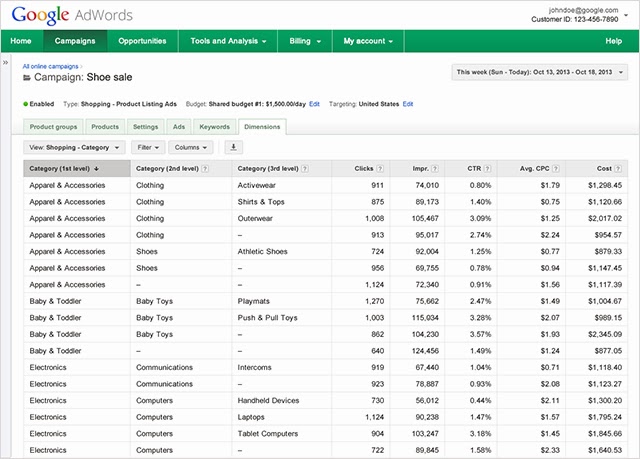
Regardless of how you choose to structure your product groups, Shopping campaigns offer the unprecedented ability to view your performance data by product or product attribute. Since performance metrics are associated with the item and not the product group, you can filter and segment data by your product attributes. This includes Google product category, product type, brand, condition, item id and custom labels. For example, you’ll see which Apparel & Accessories categories drive the most clicks, without having to break out your clothing category into a separate product group.
3. Competitive data to size your opportunity

To help you optimize and scale your PLAs, Shopping campaigns provide insights into your competitive landscape. In the Product Groups tab, you can add benchmark columns to see the estimated average CTR and Max CPC for other advertisers with similar products. The competitive performance data you see is aggregated and averaged, so all performance data is anonymous. Coming soon, you’ll have impression share columns to help you understand the opportunity lost due to insufficient bids and budgets, and a bid simulator will help you estimate the amount of impressions you’ll receive as you adjust your bids.
How to get started

Shopping campaigns are currently available to a limited number of advertisers. It will be rolling out gradually in the US, with full global availability by early next year. API support will come in 2014 as well.

You can learn more about Shopping campaigns at some upcoming events. Join us at our Learn With Google webinar for Shopping campaigns on November 20, 2013, and find us at Search Engine Strategies in Chicago on November 6, 2013.

We've built Shopping campaigns with retailers in mind, and if you'd like to be an early adopter to share your feedback, you can express your interest here. We'd love to hear from you!

Posted by Sameer Samat, Vice President of Product Management, Google Shopping

Friday, October 18, 2013

Improvements to location targeting for international searches

The world is getting smaller. Today, people use search to shop for products and services from around the corner or across the world. This means that every business can now be a global business.

To help you connect with your customers - wherever they’re located - we’re improving the way location targeting works in AdWords. Starting the week of November 11, 2013, advertisers using either the default or ‘location of interest’ setting will be able to show ads to potential customers by taking into account both the location that people are searching for, as well as the location they are searching from -- even when they are international searches. For example, let’s say you own a hotel, and you are currently targeting Paris with the keyword “Paris hotels.” Previously, only people searching on Google.fr or Google.com from France could see your ad. Starting the week of November 11, your ads will be eligible to show to people searching for “Paris hotels” from anywhere in the world -- for example, someone who lives in New York City who is booking a vacation in Paris.

These improvements help you share your message with more customers who have expressed interest in your business and deliver a better set of results to people who are searching with locations in their intent.

Most advertisers will find that this change improves the reach of their ads with no action needed. In fact, this is currently how targeting works within countries. This update just ensures that searches across countries work in the same way. Your ads will continue to show to your target audience based on the location targeting options that you have set. In some cases you may see a change in impression volume since your ads can now show to people who are searching for your business from places where your ads weren’t previously showing.

These changes offer broader coverage for your ads while keeping your existing location options intact. If you prefer to narrow your location settings, you can still do so using advanced location options by selecting the “People in my targeted location” radio button.  You can also exclude geographic locations to prevent your ads from showing in selected regions.
People are searching in ways that transcend geographical boundaries, and we want to ensure that AdWords reflects this global reality. These location targeting updates make it easier for potential customers to find your business, and easier for you to connect with them – wherever they may be looking.

Posted by Nicholas Boos, Product Manager, AdWords

Thursday, October 17, 2013

Mobile Product Listing Ads Improvements and Success Stories

People are increasingly turning to their mobile devices as shopping assistants at home, in stores, and on the go, and constant connectivity is helping shoppers find the products they want, whenever they want. Google Shopping connects people looking for products with the best places to buy both online and in local stores, and there are big opportunities for retailers to connect with mobile shoppers using mobile Product Listing Ads (PLA), particularly as we head into the holiday retail season.

Expanded Google Shopping results on mobile devices
As part of our efforts to help retailers promote their products to people across devices, we’re updating the look of the mobile PLA unit on Google.com to help shoppers more easily browse and discover products on their mobile device. Users can now swipe to quickly see more products in the mobile PLA unit without having to leave the search results page. The unit will also feature larger product images and product titles. This update gives more retailers the opportunity to appear on the mobile PLA unit, and early tests show that it drives more traffic to retailers.

Retailer success stories with mobile PLAs
Many advertisers have already positioned themselves for success by leveraging mobile PLAs ahead of the holidays. Below are just a couple of examples.

  • REVOLVEclothing.com understands that their customers are very mobile-savvy, so they increased their focus on optimizing their mobile PLA campaign. Within a few months, they grew their mobile PLA campaign clicks by 371%, their conversions climbed 537%, and their mobile return on ad spend (ROAS) increased by 77%. Learn more.

  • HalloweenCostumes.com implemented mobile PLAs for their entire product line after seeing major lifts in their online advertising efforts via desktop PLA campaigns. Mobile PLAs are now a major driver of their overall mobile growth, delivering a 31% lift in overall mobile conversions. In addition, they focused heavily on converting new mobile traffic by redesigning their mobile site to increase the speed and overall usability of product pages and navigation. Learn more.

Show your Product Listing Ads to smartphone shoppers
If your PLA campaigns aren’t already opted into mobile, there’s still time to apply mobile bid adjustments to help you capture valuable real estate on mobile shopping search results with over a month left before Thanksgiving.

If you need help getting started, please join our webinar on Wednesday, October 23 at 10 am Pacific Time to hear tips and best practices for creating and optimizing a mobile PLA campaign.

Posted by Jennifer Liu, Group Product Manager, Google Shopping

Tuesday, October 8, 2013

Get more out of Google Shopping with Channel Intelligence

With the holidays right around the corner and shoppers already beginning their holiday shopping research online, advertisers are getting poised to reach those customers. Research from Think With Google shows that online sales during Black Friday increased by 26% last year.* By optimizing your Product Listing Ads you can not only increase your overall sales but also aid you in preparing early for a head start on this year’s holiday rush. To help you get ready, we want to share a few holiday optimization tips and insights from Channel Intelligence and also invite you to a webinar on October 15th at 11am PT.

Channel Intelligence is a feed management service acquired by Google in February. Channel Intelligence works with many merchants to deliver high quality product feeds across all major shopping engine services, including Product Listing Ads. Channel Intelligence manages feeds, optimizes bidding and provides data quality monitoring for clients. These services can help with increasing Return on Ad Spend while improving the performance of individual products on shopping engines.

Here are some best practices Channel Intelligence uses to help merchants prepare for a successful holiday with Product Listing Ads:

  • Make sure your data quality is accurate. A good data feed is important. Confirm that all of your products are correctly submitted to Google and approved. Review policies for such things as non-family safe items.
  • Get ready for traffic across devices. Shoppers will be on-the-go throughout the holidays. Reach where shoppers are by opting into mobile bidding as part of your overall holiday strategy.
  • Prepare for Cyber Monday. Shoppers are going to be looking for the best deals on products. If you are planning to have holiday promotions for your products, there’s a separate attribute for promotional text. More details can be found in the feed specifications at the Merchant Center Help Center.

Join Channel Intelligence for a webinar on October 15th at 11am PT

The team at Channel Intelligence will share knowledge and experience with Product Listing Ads to help you prepare for the holidays. The team is giving insight on how merchants can get more from their product campaigns this season. Topics will cover where multichannel retail is heading, how you can improve your ad content, and how to apply best practices to your campaigns.

If you are interested in the webinar, register here.

To learn more about Channel Intelligence services, visit www.channelintelligence.com. If you are new to Product Listing Ads and would like step-by-step instructions on how you can get started, check out our Get Started Guide.

Posted by TT Ramgopal, Head of Channel Intelligence

*Comscore, Inc., 2012 Holiday Season To Date vs. Corresponding Days in 2011, NonTravel (Retail) Spending, November 2012

Monday, October 7, 2013

Google Shopping goes local

With Google Shopping, people can easily research products, compare items, and connect with merchants online to make their purchase. We've been going global to bring a quality online shopping experience to users around the world. But sometimes the most helpful information about a product is whether you can find it at a local store nearby.

Recently, we began rolling out two new local features for Google Shopping. The first is local availability for Product Listing Ads on desktop and smartphones. When someone searches for a product on Google, she may see a Product Listing Ad for a local store. When she clicks on the ad, she’ll arrive at a local storefront where she can browse a large selection of the store’s inventory before she visits in person.

For example, someone searching for a new fragrance may see an ad letting her know it’s available at a nearby store. After clicking the ad, she’ll see product and availability information for that fragrance, along with similar items in stock at the store. She can search other available products, find store hours, and get directions. If she still needs more information, she can call the store or visit the website directly from the local storefront. Below are examples of how these features appear on mobile and desktop devices.
Both local availability for Product Listing Ads and the local storefront are based on a local product feed managed through Google Merchant Center, which allows retailers to provide users with up-to-date, item-level price and availability information for each physical store. Participating retailers pay for clicks on the Product Listing Ad to the local storefront on a cost-per-click (CPC) basis. All clicks and interactions on the local storefront are free. Retailers can also see separate local click performance.

These local features help retailers leverage the scale of Google Shopping to market items sold in their physical stores. They’re currently available to a limited set of US retailers, and we look forward to making them more widely available in the coming months. Please fill out this interest form if you are a US merchant and would like to participate in the future.

Paul Bankhead, Senior Product Manager, Google Shopping

Thursday, October 3, 2013

New Flexible Bid Strategy and Webinar: Target Return on Ad Spend

In May, we introduced flexible bid strategies as part of our ongoing initiative to improve real-time bid automation in AdWords. Today, we are announcing target return on ad spend (ROAS), a new bid strategy, as part of this broader initiative to provide greater flexibility and control over performance targets and better overall return from your ad spend.  You should see the target ROAS bid strategy rolling out to your account over the coming weeks.

Target ROAS helps you maximize revenue by automatically adjusting your keyword, ad group, and campaign-level bids to meet a custom target return on ad spend. Your target ROAS represents how much revenue you want to earn for each dollar you spend on AdWords. For example, if your goal is to earn $7 for each $1 you spend on AdWords, your target ROAS would be 700%.

Harnessing the same real-time bidding technology behind Target CPA and Enhanced CPC, target ROAS takes into account signals such as location, browser, time of day, operating system and more to adjust your bids based on your ad’s predicted performance.

Grow sales and hit your ROAS goals with ease

To demonstrate the power of target ROAS, we’ll walk you through an example. Let’s say you’re an advertiser whose conversion values vary from product to product. Ideally, you’d love to bid higher on keywords that lead to larger orders, and lower for keywords that lead to smaller ones, however, this would be time consuming and complex to do manually.

You can use target ROAS to help you dynamically select the right bid for each auction. Here’s what you’d do next:
  1. Set up conversion values in Conversion Tracking so that AdWords understands the value of orders placed on your site.
  2. Choose the ROAS percentage that matches your business goals. You can learn about setting an appropriate target ROAS here.
  3. Create a new “Target ROAS” bid strategy in the Shared Library. (see image below)
  4. Enter your target ROAS into your newly created flexible bid strategy.
  5. Apply the new bid strategy to keywords, ad groups or campaigns.
Once you’ve applied this bid strategy to keywords in your account, AdWords will predict the likelihood that a click will lead to a high-value sale. Based on this likelihood, the system then sets unique bids for each click, taking into account your specified ROAS target. Since this happens automatically and in real time every time your ad is shown, your bids are optimized toward your goals without  having to enter a single manual bid.

Once you begin using target ROAS, you’ll see a rough average of the Max CPC bids Google is setting in Search Network auctions in your Max CPC column. This helps illustrate the auctions’ bids for keywords that are using the bid strategy.

Learn more

To learn more about getting started with target ROAS, visit the AdWords Help Center. You can also tune into the Target ROAS webinar on October 22nd for a live walkthrough on setting up conversion values and using this new strategy. You can sign up for the webinar here.

Posted by Wilfred Yeung, Product Manager, Bidding in AdWords

Tuesday, October 1, 2013

Estimated Total Conversions: New insights for the multi-screen world

People are constantly connected, using multiple devices throughout the day to shop, communicate and stay entertained.  A September 2013 study of multi-device consumers found that over 90% move sequentially between several screens for everyday activities like booking a hotel or shopping for electronics.

As consumers are increasingly on the go and switching between devices, marketers are telling us they want to see a more complete and accurate picture of how their online advertising drives conversions.  Conversions can come in many forms: visits to stores, phone calls, app downloads, website sales or purchases made after consulting various devices.  Getting better insight into these complex purchase paths can help you optimize your online advertising and allocate budget more effectively.

Introducing Estimated Total Conversions

Today, we are introducing Estimated Total Conversions for search ads on Google.com.  This is an exciting first step to give marketers more insight into how AdWords drives conversions for your business by showing you both the conversions you see today, like online sales, as well as an estimate of conversions that take multiple devices to complete.  Over time, we’ll be adding other conversion types like phone calls and store visits as well as conversions from ads on our search and display network.

Estimated Total Conversions will provide you with a holistic view of all of the conversions driven by your Google search advertising that can be used to make important decisions like how much to bid and how to assign budget across your various marketing channels.  For the last few years, many sophisticated advertisers have been using their own analysis to get to these insights.  Today, we are beginning to bring this level of insight and measurement to all advertisers.

Estimated cross-device conversions

Estimated cross-device conversions is the first new conversion type to launch as part of Estimated Total Conversions. Cross-device conversions start as a click on a search ad on Google.com on one device and end as a conversion on another device (or in a different web browser on the same device).

For example, say someone shops for “blue jeans” on her mobile phone while waiting for the morning train.  She clicks on a mobile ad for ABC Blue Jeans.  When she gets to her office, she goes directly to the ABC website to make a purchase.  This is an example of a cross-device conversion.  We calculate cross-device conversions using a sample of data from users who signed into multiple devices.  Learn more about how this works.

Estimated cross-device conversions will begin rolling out globally to all AdWords advertisers starting today and continuing over the next few weeks. To see these new statistics, you’ll need AdWords conversion tracking and a sufficient volume of conversions on which to base a reliable estimate.

In the last few months, we’ve analyzed data across thousands of AdWords advertisers to learn more about cross-device conversion patterns.

When advertisers in the travel industry use AdWords estimated cross-device conversions, they are able to measure 8% more conversions, on average, than they did before.  In addition, they can now measure 33% more conversions that originated on a mobile phone and later converted on different device.  This helps them attribute all those sales -- from customers who searched for flights and hotels on their mobile phones and then made a purchase from another device -- to the right ad.

Similarly, other verticals, like entertainment and retail are also seeing positive results.  Businesses in these industries are now able to measure 12% and 7% more conversions, respectively, than they could before using Estimated Total Conversions.

Sean Singleton, Marketing Manager at American Apparel noted that, "We always knew our online ad investment was influencing conversions across devices, but we didn't know how to begin estimating these numbers. Once we saw that 5.3% more conversions could be attributed to cross-device conversions in AdWords, we knew we could more accurately calculate the value we were receiving from each ad click.  We also learned that mobile ads are driving 16% more conversions than we thought, so we are now investing more into this channel to gain more sales.

More results from other verticals can be seen below.


Paving the way for marketers to measure the full value of their online advertising

We are committed to helping you gain insight into the new conversion types that are part of a constantly connected, multi-screen world so that you can make the best advertising decisions possible. In addition to cross-device conversions, both phone calls and store visits will be included as part of Estimated Total Conversions in the coming months. These are important conversions to consider — people make more than 40M calls to businesses each month directly from Google ads and are often looking for physical store locations when they search on Google, particularly on the go.

We look forward to your feedback on estimated cross-device conversions and are working hard to add new features.  Over the coming weeks we’ll dive into the new features with tips and best practices on the Inside AdWords blog and on the new Think Insights page for conversions. We hope you will join us.

Posted by Sridhar Ramaswamy, SVP, Ads and Commerce

Wednesday, September 25, 2013

Create beautiful, engaging display ads in seconds with Ready Creatives

Building on VP of Product Management Neal Mohan’s presentation to the Mobile Marketing Association about building cross-screen creative in HTML5, and Product Management Director Brad Bender’s keynote speech about advances in creative formats at IAB MIXX yesterday, we’re excited to announce the launch of Ready Creatives – our groundbreaking new solution to make display ad creation easier than ever. Ready Creatives consists of two powerful tools: Ready Image Ads and Ready Ad Gallery.

Display ads today need to captivate consumers with rich creative and dynamic messaging. But creating an engaging, beautiful ad takes time and effort. High quality ad creation – until now – has been a big challenge, putting it out of reach for small to medium businesses. Ready Creatives puts the power back in your hands – and makes it easier than ever before to create beautiful ads that can be consistently displayed across screens.

Instantly build IAB Standard, HTML5 compatible ads with Ready Image Ads

With one single click, take advantage of Ready Image Ads flexibility by simply adding your website URL to automatically construct display ads based on images from your website.  You can customize further by adjusting the text, font, color, images, headlines, URL and more – in a way that best tells your story. Our friendly user-interface and streamlined process enables you to build display ads in minutes, automatically creating IAB standard ads in HTML5 formats using your existing elements from your website or your own uploaded images. And these HTML5 ads can be viewed across mobile devices as well as desktops!
Provide your website URL and Ready Image Ads automatically builds a variety of beautiful ads for you to use in your campaigns

Beautiful ads at your fingertips in Ready Ad Gallery

Ready Creatives doesn’t just quickly cobble together the elements you want included in your ad – it helps you build campaigns that engage customers with stories they love, remember and share. Our Ready Ad Gallery features pre-built templates you can easily customize based on your campaigns goals.

Choose from the following formats and watch your display ad come to life:
  • Dynamic Ads – Dynamic Ads deliver tailored creative across the web that combine the layouts, products, messages and offers that your customers are most likely interested in, based on what they viewed on your website.
  • Engagement Ads – Engagement Ads captivate consumers with rich creative messages. They fit in standard display units, allowing to scale across the web, and then expand to a larger format after an innovative two-second hover delay. 
  • Video Ads – Videos are as effective as TV in building awareness of your business.  Create a quick video ad in seconds that showcases your brand.
  • General Purpose Ads – if you need a simple display ad, browse through our hundreds of template options and customize in our easy-to-use editing tool.
Building display ads has never been simpler, and we’re making this capability accessible to all advertisers at no additional cost, and as part of the AdWords campaign workflow. No matter what type of ad you choose, you can be sure you will not only have saved time and money but also have created an ad your customers and prospects are sure to love.

To get started using Ready Creatives today, log into your Adwords account and click on the Ads tab. For more information, visit www.google.com/think/products/ready-creatives.html.

Posted by Ashley Jiang, Product Manager, Google Display Network

Monday, September 23, 2013

Customize your AdWords conversion window to more accurately measure your performance

A consumer’s journey to purchase isn’t always immediate. People may search on a number of keywords, over several days and across different channels before making a purchase. Sometimes decisions span a few days, but more significant decisions, like buying a car or booking vacation travel, can take longer.

To help you have a more complete and accurate view of your customers' path to purchase as you optimize and evaluate your ROI, we recently launched cross-account conversion tracking and the ability to import conversions in AdWords.

Today, we're also adding the capability to customize your conversion counting window from 7 to 90 days after a click. Previously, AdWords only counted conversions occurring within 30 days after a click.

Benefits of customizing your conversion window:
  • Capture more high-consideration conversions. Many advertisers sell products that customers want to research thoroughly before making a purchase -- for example, a new insurance policy or an expensive laptop. Sometimes, conversions for these products may take longer than 30 days to occur. You can now ensure you measure more of these conversions and get a more complete picture of the value of your advertising.
  • Measure longer term value of your customers. Some businesses have a goal to drive repeat purchases from recent customers. For these businesses, extending the conversion window means you can now measure more of these repeat purchases and gain insight into the longer term value your advertising drives.
  • Discover more upper funnel keywords. By increasing the length of the conversion window, you can discover keywords that play a role much earlier in the conversion funnel, especially if the shopping cycle is long for your customers.

Customizing your conversion window

You can edit your conversion window in the ‘Conversions’ tab under Tools and Analysis (see image below):
Click image to enlarge

When you click to edit your conversion window, you'll see a link to the Search Funnels time lag report. When you view this report, you’ll see the average and a distribution of the length of time it takes your customers to complete a conversion after clicking on keywords in your account. You can use this to help you decide how long of a window to set.

For more information on how to customize your conversion window, check out this help center article.

Posted by Vishal Goenka, Product Manager, Conversions in AdWords

Thursday, September 5, 2013

Measure & Optimize for Offline Sales with AdWords Conversion Import

Potential buyers have increasingly turned to the web as the first step in their purchase decisions.  So for years, digital marketers in insurance, auto sales, and other high consideration industries have been using AdWords to build awareness and generate leads. These leads have been handed to sales reps, who then help customers complete the purchase process.

In AdWords, you’ve been able to see which keywords lead to higher or lower lead volumes, and to optimize for a cost per lead goal. But there's been no easy way to measure and optimize in AdWords for events that happen beyond the website, like a customer order taken over the phone by your sales team.

New Conversion Import Feature

The new AdWords conversion import feature can help you measure and optimize for the complete end-to-end purchase process. Now you can upload your offline conversion events into AdWords and see how clicks on your ads led to sales made in the offline world such as over the phone or via a sales rep.

Click image to enlarge

And since your offline conversion events will be incorporated into your existing AdWords conversion data, tools such as Search Funnels, Automated rules and Flexible bid strategies can leverage that data.

How you might use the conversion import feature

Let’s see how importing conversions can help a small business measure and optimize for the entire customer journey, from online leads to offline sales.

Isabelle designs, builds and sells high-end custom furniture. She uses AdWords to drive prospective customers to her website, where they can submit their contact information and request a sales call. AdWords Conversion Tracking can measure these raw lead submissions, but since most of them won’t result in a sale, she optimizes her campaigns on raw submitted leads; not actual sales.

Now that she’s able to import her offline conversion data (including sale value), Isabelle can better understand which keywords drive the most profitable sales. With a more accurate ROI picture, Isabelle can better manage her bids and budget.

How to get started

For step by step directions to get started, check out this article on how to import your offline conversions.

Several software solution providers, including Marketo, Mongoose Metrics and SugarCRM have also posted guides on integrating with this new feature.  In addition, we have published a guide for integrating with Salesforce.com’s Sales Cloud.

More to come

As we mentioned last week, with the launch of cross-account conversion tracking and Search Funnels, we’re working on tools like the conversion import feature to help you measure your customer’s complex path to purchase.

Our product roadmap has lots of improvements and new features aimed at providing a more complete picture of your customers' journey and more accurate measure of ads effectiveness across devices and across channels. Stay tuned!

Posted by Jon Diorio, Product Management Lead, AdWords Reporting & Insights