Showing posts with label Facebook Friday. Show all posts

Friday, January 4, 2013

Facebook's Year in Review: What Did Your 2012 Look Like?

As you look ahead to a successful 2013 with fresh, new goals and an inspired perspective, take a moment to look back on everything you accomplished in 2012! Thanks to a fabulous goal-setting sheet from Laura of the Mixonian Institute, I did just that (look back on 2012) on a sunny afternoon in December. 

One of the things I wrote down was 12 things I'd accomplished in 2012.  This prompted me to revisit the 50 goals I'd set in 2010. I was delighted to be able to cross 44 off the list!

Facebook has a helpful feature that can get you started in the exercise of recapping 2012 goals reached as you plan for 2013.  It's called their "year in review" feature, and you can access yours by visiting http://www.facebook.com/yearinreview. There, you'll find your 20 biggest Facebook moments from the year, including highlighted posts and popular stories. 


I'll be sharing my 2013 goals over on my personal blog, LauraCatherine.co and hope you'll stop by for a visit.

Laura is a marketing professional and blogger who has been active in social media since 2005.  If you enjoyed this post, please consider subscribing to this blog
via Email or  RSS. Laura can also be found on Twitter (@LauraCatherineO), Facebook, and LinkedIn.
 

Thursday, May 31, 2012

How to Schedule Posts in Facebook (for Page Admins)


Do you schedule Facebook page posts in advance using third-party apps like Hootsuite? You may already know posts made with these apps are less likely to be read, but we have all done it from time to time.

Exciting news for Facebook page admins! Facebook recently announced their own scheduling feature.   I’m most excited about this because it means the “posted from Hootsuite” text and icon are no longer necessary when you must schedule a post. 

If you are a business owner and page admin with a longer to-do list than there are hours in the day (or if you simply want more free time), the new Facebook scheduling feature will allow you to provide content to your fans in less time than was previously possible, without using a third party app!

How to Schedule Posts in Facebook (for Page Admins):
Refer to the official Facebook graphic below.


How Far Out Can I Schedule?
At the time of this post, Facebook posts can be scheduled up to six months in advance at 15-minute intervals.

Any Cons?
One catch (at the time of this post)? According to Mashable, “once you schedule a post, you can’t modify or edit the content, only the time.”  My guess? Facebook will remedy this soon. 

Where to Review Scheduled Posts?
Want to review scheduled posts? Again via Mashable, click on “manage” at the top of your page, then select “activity log” from the drop-down. 

Ready to Get Started?
Now would be a great time to block out a few hours to create “evergreen” content if you don’t already have some handy.  Photos, helpful info, inspirational tid bits, you-name-it.  I typically write my content in a working word doc, then copy/paste one update at a time, adding photos and links. 

Remember...
Of course, you’ll want to have access to Facebook to check for replies/likes/questions.  Still overall a time-saver in my book, though.

Hope you enjoy!
 
Laura is a marketing professional and blogger who has been active in social media since 2005.  If you enjoyed this post, please consider subscribing to this blog
via Email or  RSS. Laura can also be found on Twitter (@LauraCatherineO), Facebook, and LinkedIn

Wednesday, April 4, 2012

Facebook Timeline Format - How Have You Transitioned?

With the new Facebook timeline format here, many of us have been making changes big and small.  The first change you've probably made by now is adding a cover photo.  If you haven't done this yet, refer to this post for ideas.  Even if you don't know how to size a photo, you can always upload a favorite photo and crop to fit the space. 

There is something I really like in the new timeline format that I wanted to point out.  Have you noticed that you can upload thumbnail images for your "tabs" in the new format? Before, you were stuck with whatever tiny icon came with the app or tool you used for your tab. 

Now, you've got a generous amount of space (111 X 73 pixels) to entice your page visitors to click for more! The first thumbnail is reserved for your photos, but the THREE to the right of that are yours to set-up and decide! See below (red arrows) for example.


Add what we used to call a "welcome" screen - now a custom tab of sorts.  Although you can't make it the first thing people land on when they visit the page, you can use the thumbnail space strategically to draw people in for more exploring.

Are your creative wheels turning? I hope so!

How will you use this space?

Laura is a marketing professional and blogger who has been active in social media since 2005.  If you enjoyed this post, please consider subscribing to this blog
via Email or  RSS. Laura can also be found on Twitter (@LauraCatherineO), Facebook, and LinkedIn.
 

Monday, March 5, 2012

Takeaway #2 about the new timeline for pages format on Facebook: Default Tabs

The second takeaway from the webinars I attended last week regarding the new Facebook timeline format: we can no longer use a “welcome” or other tab/screen as the default landing screen in the new Facebook timeline format for pages.  Instead, your cover photo and wall will be the first thing people see.  This doesn’t mean these custom tabs are going away – it just means we’ll have to drive traffic to them in a different way.

It’s time to really focus on a strategy for the cover photo, since what you place in that space is a big part of people's first impression of your brand/business.

Just to recap from my last post re: the cover photo, here are a things to consider:
• Your cover photo can’t include price or purchase information about your products or services
• Your cover photo can’t include any contact information about your brand
• Your cover photo can’t include a call-to-action (“like us for a chance/coupon/special offer…” etc.)

I like the nice width on the cover photo, and belive there is a lot you can do with 850 X 315 pixels!
I’ve come across a few great cover photos on pages that have made the switch to the new timeline format and wanted to share them with you here to get your creative juices flowing! I’ll be sharing more as I come across them!

1) Hay Hill Garden Market
What a beautiful way to showcase a beautiful photo.

2) Mackenzie Image Consulting
Love this gorgeous photo! These ladies have it together and it shows.
Remember, there are plenty of great uses for the cover photo space!  
  • Beautiful branding presented in a crisp, classy design.
  • Exceptional photography that showcases your business best.
  • Playful designs that make good use of the space.
  • And more!
Until next time…

Laura is a marketing professional and blogger who has been active in social media since 2005.  If you enjoyed this post, please consider subscribing to this blog
via Email or  RSS. Laura can also be found on Twitter (@LauraCatherineO), Facebook, and LinkedIn.
 

Friday, March 2, 2012

The New Facebook Timeline for Pages Takeaways

I attended two webinars on Friday about the new Facebook timeline format for pages. By now you’ve likely heard that Facebook will be rolling out this new(est!) format on March 30, 2012 for all Facebook pages.

By now I’m used to “new” formats on Facebook and Twitter (and YouTube and beyond) – I don’t think the upgrades will ever go away. Just like a website should be fluid and always in the process of one update or another, changes in functionality and usability are just a part of the online (mobile, appified, etc.) world we live in. Instead of getting frustrated or overwhelmed, I try to approach the upgrades as just that – upgrades.

The list of changes coming with the latest Facebook upgrade is long enough that I’m going to devote a few posts to them instead of packing it all into one long post. Plus, Mashable and so many other tech bloggers will create catchy lists that will summarize everything for us in the coming weeks. For now, we’re all here to process the information and approach our pages with renewed focus and tweaked strategies.

Takeaway #1 for the new Facebook timeline for pages format:
Your page will have a cover photo space, measuring 850 X 315 pixels. There are plenty of neat ways to use this space BUT before you create your cover graphic, here are a few things to keep in mind (per Facebook):

• Your cover photo can’t include price or purchase information about your products or services

• Your cover photo can’t include any contact information about your brand

• Your cover photo can’t include a call-to-action (“like us for a chance/coupon/special offer…” etc.)
See how pretty the cover photo space can be!
Now that you know what you can’t include in your cover photo, don’t get discouraged!

There are plenty of great uses for this space.
  • Beautiful branding presented in a crisp, classy design.
  • Exceptional photography that showcases your business best.
  • Playful designs that make good use of the space.
  • And more!
I’ll be back soon with more Facebook timeline takeaways…

PS – I finally dropped to ".blogspot" portion of my URL. I’m in the same place, though! Shortened it up to “MarketingWithLaura.com” – easier to say and remember. I’ve long had a separate business website and personal blog, but was bothered by the URL over here. Hope we don’t notice any disruptions in feeds, etc! If anything seems off, please let me know.

Laura is a marketing professional and blogger who has been active in social media since 2005.  If you enjoyed this post, please consider subscribing to this blog via Email or  RSS. Laura can also be found on Twitter (@LauraCatherineO), Facebook, and LinkedIn

Thursday, March 1, 2012

Facebook Timeline for Pages: What to Expect, Plus iGoogle News

Lots going on in the online world this week!

Of course, the big Facebook timeline for pages announcement spread quickly across the www yesterday. I’ve been using the timeline format on my personal page since it was released to developers and will be attending a free webinar from Wildfire app to learn about the changes coming for pages when it comes to the new format.

If you manage a page on Facebook, I’d recommend you join in on the Wildfire: Timeline for Brands call (Friday, March 2 at 1 pm EST) as well! It’s free and will give you a head start on the new changes.


Topics planned for the call include:

• The 6 major changes every marketer needs to know when updating their brand profiles to Timeline

• How to best capture visitors' attention on your page after its Timeline makeover

• Ways to feature important content and tell the story of your brand

• How to re-think engagement applications within the new layout without losing everything you've built

Also, we’ll surely also see detailed breakdowns of the changes on top sites like Mashable in the coming days/weeks.

Secondly, my beloved iGoogle is getting a facelift. I’m previewing the changes now and will be bringing you a post on those changes in the coming days.

Until then, I’ll be studying the new timeline for pages on Facebook!

Laura is a marketing professional and blogger who has been active in social media since 2005.  If you enjoyed this post, please consider subscribing to this blog via Email or  RSS. Laura can also be found on Twitter (@LauraCatherineO), Facebook, and LinkedIn.
 

Tuesday, December 6, 2011

Facebook Insights Update: How to Export Old Insight Data (by December 15, 2011)

Do you use Facebook Insights? It’s a helpful tool that tells you how many people are visiting your business page each month. It also gives you the number of post views, the kinds of users your page has, and the most popular interactions, among other things.


Today I’m sharing a Facebook Insights update.  Here’s the scoop: on December 15, 2011, the “old” Facebook Insights tool will stop collecting data. Instead, the new “Pages Insights” will be the go-to tool for analytic information on your biz page.


All old insight data will be deleted on 12/15, so Facebook recommends that you login to the “old” insights before then and export anything that you want to keep. I’m sure the “new” insights tool will offer even more data and become one of your favorite tools!


Since I’m not sure what will stay and what will go, I recommend logging into your old insight data before 12/15 and doing a few exports of the various insights (overview, users, and interactions) so that you’ll have the information handy should you ever need it.

Facebook Insights Update: How to Export Old Insight Data (by 12/15/2011)
1. Login to your Facebook account

2. Go to your Facebook business page

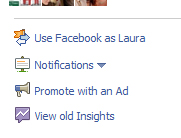
3. Click on “use Facebook as [your business page name]”

4. Click on “view old Insights” from the right-hand side of the page (below admins)

5. Refer to “overview”, “users”, and “interactions” tabs at left-hand side of the page.

6. Be sure to click on “export” above the data.

7. Select your dates (go as far back as you’d like to) and format, then click “download”

Be sure to visit my blog again in mid-December for a review of the new “Pages Insights” tool being rolled out on Facebook.


Laura Catherine Otero is a marketing professional and blogger in Charleston, SC who has been active in social media since 2005.  If you enjoyed this post, please consider subscribing to this blog via Email or  RSS. Laura can also be found on Twitter (@LauraCatherineO), Facebook, and LinkedIn

Saturday, November 26, 2011

Update to Facebook URL Post

Last November I shared step-by-step instructions on how to shorten your Facebook URL.  At the time, you needed 25 fans to shorten your Facebook business page URL.  It usually didn't take long at all to get to 25 fans, but the challenge may have been remembering to go back and shorten the URL after you created the page! Thankfully, Facebook has changed their policy and now allows you to shorten your business page URL before reaching 25 fans.

Have you shortened your Facebook URL yet? It really comes in handy when you are advertising your page, via TV, radio, your biz card, print, in-person, etc!

Here is a link to the updated instructions: http://strategiconlinemarketing.blogspot.com/2010/11/how-to-shorten-your-facebook-business.html. Enjoy!

Laura Catherine Otero is a marketing professional and blogger in Charleston, SC
who has been active in social media since 2005.  If you enjoyed this post, please consider subscribing to this blog via Email or  RSS. Laura can also be found on Twitter (@LauraCatherineO), Facebook, and LinkedIn

Friday, September 30, 2011

To Allow or Not To Allow? The Facebook Subscribe Button

When I visited Facebook today, I was greeted with the following message, direct from Facebook:


It read,

New: The Subscribe ButtonNow you can let anyone who's interested subscribe to things you share publicly.

The message also included a list of my friends who were already using subscribe. 

Fellow blogger and friend Angie Mizzell recently wrote about the subscribe button, and how she'd be using it in a way that made sense for her and her friendbase.

Will you be allowing subscribers to your Facebook updates? I can't help but notice that this feels similar to Google's "circles" in a way.  Not that that is a bad thing! On Google+, you get to decide who receives the updates you share.  You first must group your friends in circles.  A friend-in-real-life circle, an acquantance circle, an I'm-not-sure-who-you-are circle, etc.  Then, when you post something, you tell Google+ who gets to see the update. 

With Facebook's subscribe button and feature, you decide if your status update is public or for friends-only.  The public updates are shared with all of your subscribers, friends or not, IF you've opted-in to activate the subscribe button for your profile.

Will I be turning the subscribe button on? I'm not sure yet.  I pride myself on being an early adopter of all things social media, but I'm not sure how I feel about this just yet.  It seems to make a lot of sense if you're using your Facebook like Angie is. It also makes a lot of sense for folks who regularly share their blog posts on Facebook.  Like me. Hmmm...

Get the full explanation about the subscribe button on Facebook's official page about it here.

I'm curious to know if you've turned this feature on for your profile.Why or why not?

Laura Catherine Otero is a marketing professional and blogger in Charleston, SC
who has been active in social media since 2005.  If you enjoyed this post, please consider subscribing to this blog via Email or  RSS. Laura can also be found on Twitter (@LauraCatherineO), Facebook, and LinkedIn

Friday, May 27, 2011

How to Link Your Facebook Profile to your Facebook Business Page (under "Employment Info")

It's "Facebook Friday" and I'm excited to share a fantastic tip I came across this week!

The AllFacebook.com article pointed out that many of us are missing a real opportunity to link our personal Facebook page to our business Facebook page at the very top of our profile (where employer info is listed). They called it a "#1 Mistake" and I have to admit it was something I was doing as well! Many of us list our company name or web address, but may have not realized we could just as easily link to the actual Facebook business page...very handy!

Hop over the the article to get the quick and easy-to-follow instructions on updating your Facebook profile to link to your Facebook business page under your "employment" info.

http://www.allfacebook.com/has-your-facebook-profile-made-this-1-mistake-2011-05
 

Laura Catherine Otero is a marketing professional and blogger in Charleston, SC who has been active in social media since 2005.  If you enjoyed this post, please consider subscribing to this blog via Email or  RSS. Laura can also be found on Twitter (@LauraCatherineO), Facebook, and LinkedIn

Thursday, May 26, 2011

How to Link Facebook to Twitter: a "Tutorial Thursday" post


Today's "Tutorial Thurs" post covers how to link your Facebook business page status updates to your Twitter account.  Please note, this tutorial is for those who manage business pages on Facebook, and doesn't work for your personal page.

Linking your Facebook business page to Twitter is a time-saving tool.  Nothing replaces a carefully crafted tweet...but this is a good option for those who may otherwise not have the time to update in both places. 

How to Link Your Facebook Business Page to Twitter:

1. Login to Facebook (also login to Twitter if you have tabbed navigation, otherwise, you can log into twitter on Step 4)

2. Visit http://www.facebook.com/twitter

3. Click on "link to Twitter" for the Facebook business page you'd like to link to Twitter


4. Click on "authorize app" on the Twitter screen that appears. After the link occurs, you'll be taken back to Facebook (the Facebook.com/twitter page).  


5. Click on "edit settings" to specify what items you'd like to appear on Twitter (status updates, photos, video, links, notes, events, etc.)


You're all set! Your Facebook business page posts will now appear on your Twitter page.

If you're looking for other time-saving tips, you may also enjoy automatically publishing your blog posts to Facebook and/or Twitter via Twitterfeed.  The name "Twitterfeed" suggests it's a twitter-based service, but they handle Facebook publishing, too! This is another time-saver that works well for those who wouldn't otherwise be able to promote blog posts over on Facebook/Twitter due to time constraints.  Again, nothing replaces you posting/promoting blog posts Facebook yourself, but this is still a good solution.  That post is over here: http://strategiconlinemarketing.blogspot.com/2011/02/how-to-connect-your-blog-to-facebook.html

Laura Catherine Otero is a marketing professional and blogger in
Charleston, SC who has been active in social media since 2005.  If you enjoyed this post, please consider subscribing to this blog via Email or  RSS. Laura can also be found on Twitter (@LauraCatherineO), Facebook, and LinkedIn

Thursday, May 5, 2011

How to add a Twitter Tab/Icon to your Facebook Business Page

If you manage a Facebook business page, you may have noticed other business pages with a Twitter icon as one of the tab options (example below).  This is different from simply connecting your Twitter “feed” to post to your Facebook wall…something that you may or may not choose to do, depending on how often you post on Twitter.

Example of a Twitter tab/icon on my Facebook Business page

In today's "Tutorial Thursday" post I'll walk you through adding Twitter as an icon/tab on your Facebook business page, allowing visitors to see recent tweets when the Twitter icon/tab is clicked on your Facebook page. I like this option because it allows your fans to see that you have a presence on Twitter without filling your business page status updates with tweets.  Before we begin, you may also be interested in adding a YouTube icon/tab to your FB biz page. I shared that tutorial over here.

How to add a Twitter Tab/Icon to your Facebook Business Page
1. Login to Facebook

2. Visit this link for Involver Fan Page applications: http://apps.facebook.com/involver_mohfpfdp/?ref=ts

3. Click on “click here to install” on the left-hand side of the page

4. Select the page you’d like to add the Twitter tab to from the drop-down menu

5. Click on “Add Twitter for Pages

6. Enter your Company Name, Phone Number and accept the terms of service (this information is not shared on your Facebook page, it’s a step for the app install only)

7. Click on “Save Changes

8. Enter your Twitter username (in @YourUsername format) and click “add”
9. Now select the number of recent tweets to show (anywhere from 5-40 at the time of this post) and click on “save changes”.

You’re all set! It may take a few moments for your Twitter icon/tab to appear on your FB biz page.

Laura Catherine Otero is a marketing professional and blogger in Charleston, SC who has been active in social media since 2005.  If you enjoyed this post, please consider subscribing to this blog via Email or  RSS. Laura can also be found on Twitter (@LauraCatherineO), Facebook, and LinkedIn

Friday, April 15, 2011

How to Add YouTube Channel to Facebook: A "Facebook Friday" post

Do you have a youtube channel? Have you ever wondered how to add youtube to your facebook business page?

On today’s “Facebook Friday” I’ll be walking you through adding youtube to your facebook biz page, using the most popular (at the time of this post) application on Facebook for Youtube.

It only takes a few minutes, and is well worth the time if you want to expose more folks (and fb fans) to your youtube videos!
How to Add Your Youtube Channel to Your Facebook Business Page
  1. Login to Facebook
  2. Visit this page: http://www.facebook.com/YouTubeApp. Like the page and click on "go to app". 
  3. Click on "click here to install".  
  4. This brings you to the “content” page.  Here you’ll enter your Youtube username and select your display preferences.
  5. Check “hide related videos” ß just a personal preference, but sometimes related videos can be a bit controversial by accident, especially because you have no control over them since they are not yours.
  6. Click “save changes” and “return to facebook page”.
You’re all set!

Your youtube channel will now appear below your profile picture as a clickable icon. Example below from my facebook biz page. 


Laura Catherine Otero is a marketing professional and blogger in Charleston, SC who has been active in social media since 2005.  If you enjoyed this post, please consider subscribing to this blog via Email or  RSS. Laura can also be found on Twitter (@LauraCatherineO), Facebook, and LinkedIn

Friday, April 8, 2011

New Facebook Business Page Design to Share for the Napkin Wizard


I have a new Facebook business page design to share on this “Facebook Friday”.  It’s one I recently created for the Napkin Wizard (@NapkinWizard) Jimmy Ng.  

I love how creative Jimmy is! He has created more than 200 napkin folding designs, and wanted to start a website and blog to share the designs with others who share his love for entertaining.  Jimmy has seen first-hand the ice-breaker / conversation-starter that a beautifully set table with a one-of-a-kind napkin fold can be. After we created his website and blog, Jimmy was ready to enter the Twitterverse and Facebook community.  I was able to use many of the same design elements, but with a new spin, over on Facebook.  You’ll notice his website background became the background for his Facebook welcome screen.  

If you’re looking for creative ways to “wow” your party guests, be sure to “like” Jimmy’s Facebook page.  He’s new to Twitter, too, and is lovin’ it! 


Laura Catherine Otero is a marketing professional and blogger in Charleston and Columbia, SC who has been active in social media since 2005.  If you enjoyed this post, please consider subscribing to this blog via Email or  RSS. Laura can also be found on Twitter (@LauraCatherineO), Facebook, and LinkedIn

Friday, April 1, 2011

Converting Your Facebook Profile to a Page


Today’s “Facebook Friday” tip is HUGE for those businesses who mistakenly (or maybe even knowingly) created a facebook profile instead of a facebook page.  This tip hit my twitterverse thanks to @ashleytcaldwell.  She’s on my “all-time-faves” twitter list, and I can’t say enough about how well that list has served me!

Did you create a facebook profile instead of a biz page? Do you know the difference? One way to know if you have a profile or a page is that people "friend" a profile (because it's supposed to be a person) and people "like" a business page. FB pages can't request friendships, which is why some businesses felt that operating as a profile (person) was more desirable than creating a business page. For many reasons, it's best (hands-down) to create a Facebook business page, not a profile, if you are a business.  In Facebook's own words: "Pages offer more robust features for organizations, businesses, brands, and public figures, which you can learn more about here."

I’ve seen some pretty creative names used for profiles, so I know there are more than just a few businesses who created profiles instead of pages for one reason or another.  I actually made this mistake in 2004, when I created a FB profile for Columbia, SC.  Even those of us who know and love Facebook have had to learn along the way! 

If you’re a business running a profile instead of a page on Facebook, now is a great time to convert your profile to a page!

Here’s a link to FAQs and info on this process from Facebook:

Here's the Mashable article that shares info about this feature:

Please note: “Be aware that when you convert your profile to a Page, your profile pictures will be transferred, and all of your friends will be automatically added as people who like your Page. No other content will be carried over to your new Page, so be sure to save any important content before beginning your migration.”

Also, “Migrating is irreversible at this time, so you may want to download your profile information — including photos, wall posts, messages and friend list — before making the switch.” 

Laura Catherine Otero is a marketing professional and blogger in Charleston, SC who has been active in social media since 2005.  If you enjoyed this post, please consider subscribing to this blog via Email or  RSS. Laura can also be found on Twitter (@LauraCatherineO), Facebook, and LinkedIn

Friday, March 4, 2011

The Facebook Sweepstakes Journey is Wonderful!


Last week on “Facebook Friday” we talked about Facebook sweepstakes.  You may recall something caught my attention as I was researching the ins and outs of holding a sweepstakes on facebook…

“The facebook business page that offers contests/special promotions has (on average) twice as many fans as the facebook business page that does not.”

Wow! This continues to impress and amaze me. Even better, running a sweepstakes on Facebook doesn’t have to be expensive! Sure, there are always the total bells-and-whistles upgraded features for top dollar amounts (thousands), but you can run a week-long sweepstakes with Wildfire app for less than $50 (at the time of this post). I wanted to run a sweepstakes, and I was buzzing with ideas on how I could try this awesome application out!   The timing just happened to be perfect (totally meant-to-be) for me to create a facebook sweepstakes for my dear friend Kelly Thiel.


Kelly launched her new logo and look this week. I had the privilege of being the designer behind her new look (thank you, Kelly!).  Of course, her beautiful art speaks for itself and really helped pull the graphic elements together so nicely!  The new look was cause for a real celebration! She’d already been working on a special giveaway, since we’d discussed it during one of our weekly meet-ups a month or so ago.

The original plan was to hold a giveaway on her blog.  With this new sweepstakes revelation I’d been having, though, she was game to give that a go instead!  We created an account with Wildfire app, and within minutes were working on building her sweepstakes! Best. Idea. Ever!

I’m including links to her sweepstakes. Please visit today! It ends Monday, so you won’t be able to view and experience the features for long.  I’m including screengrabs below as well, for future reference.

How Did We Build the Sweepstakes?
We built the sweepstakes using Wildfire. 

Sign-up takes just a minute, and then you can start building your sweepstakes!

Campaign creation is a 6-step process:
  1. Enter Campaign Details
  2. Establish a Timeline
  3. Customize Your Entry Form
  4. Upload your Banners/Graphics
  5. Create your sweepstakes Rules
  6. Publish your sweepstakes (lots of handy tools in the publish feature!)
Screengrabs of Kelly's Sweepstakes (for future reference...the contest ends Monday, March 7.  Hop over and enter before then!):


Laura Catherine Otero is a marketing professional and blogger in Charleston, SC who has been active in social media since 2005.  If you enjoyed this post, please consider subscribing to this blog via Email or  RSS. Laura can also be found on Twitter (@LauraCatherineO), Facebook, and LinkedIn

Friday, February 25, 2011

Impressive Fact about Facebook Promotions: A “Facebook Friday” Post


Did you know?

The Facebook business page that offers contents/special promotions has twice as many fans as the biz page that does not
.


Read that sentence one more time. Pretty impressive, don't you think? I’m sharing because it’s a revelation I’ve had this week!

Using the sweepstakes feature on Facebook isn’t limited to just sweepstakes.  In fact, if offers the following:

  • Sweepstakes
  • Group Deals
  • Sign-up forms
  • Coupons
  • Photo/Design Contest
  • Video Contest
  • Essay-based contest
  • Quiz
  • Trivia
  • Favorite Picks
Facebook sweepstakes are powered by a company called Wildfire App.

Interested in learning more Facebook sweepstakes? 

  1. Be sure to stop by the official page on Facebook to “like” it, then click on “Go To App”.  (http://www.facebook.com/apps/application.php?id=28134323652).
  2. This will bring you to the headquarters page, which is full of lots of fun promotions currently being run on Facebook. http://apps.facebook.com/sweepstakeshq/.  Click on “Create Your Own Promotion”.  This will launch you into the Wildfire App page.
  3. On the Wildfire website, click “Sign Up”, then create your promotion! Wildfire app makes it super-easy with step-by-step instructions.   
Want to learn more about the options before creating a promotion? 
You can read more about the items on the list above here (including pricing) here:

I hope I've inspired you to do a little research and brainstorming regarding Facebook sweepstakes.  I think it will be worth the time and small investment to incorporate into your social media marketing plan for the coming months ahead.  

Of course, I’ll be updating more about FB sweepstakes in the coming weeks/months.  I’m planning a few right now and can’t wait to share!  

Laura Catherine Otero is a marketing professional and blogger in Charleston, SC who has been active in social media since 2005.  If you enjoyed this post, please consider subscribing to this blog via Email or  RSS. Laura can also be found on Twitter (@LauraCatherineO), Facebook, and LinkedIn

Friday, January 21, 2011

A New Facebook Biz Page Design to Share from My Portfolio on this "Facebook Friday"

It's "Facebook Friday" together.  This week has truly flown by! I wanted to share a new Facebook business page design that I recently created for the talented author B.J. Welborn.  I'm not sure if you are a Civil War enthusiast/history buff.  Personally, I'm becoming more and more passionate about history now that I work part-time with a Historic Foundation and have had the pleasure of working with B.J.  

B.J. is writing a book about her Civil War Odyssey, and it's unlike any other take on the Civil War that you may have read.  She's edgy, asking the tough questions, and an all-around bold and brave lady!

Here's a sneak peak at her Facebook Biz page and blog.  I hope you'll consider stopping by.  I can barely wait for her to share her amazing odyssey with us, and I truly mean that!

Her Facebook page...

Her blog...
Have a great weekend!


Laura Catherine Otero is a marketing professional and blogger in Charleston, SC who has been active in social media since 2005.  If you enjoyed this post, please consider subscribing to this blog via Email or  RSS. Laura can also be found on Twitter (@LauraCatherineO), Facebook, and LinkedIn

Sunday, January 16, 2011

A Facebook Welcome Page to Share (from my portfolio)

I recently had the privilege of creating a Facebook business page for Coastal Community Church in Charleston, SC. 

Coastal already had an awesome looking website, which gave me plenty of color and design inspiration to draw from.  Add to that, an awesome, fresh logo that was also new for the church, and I had more than enough to get me buzzing with ideas for the Facebook page design.

The welcome screen/profile banner I created is seen below.  If you live in/around Charleston, SC, be sure to stop over to see the Coastal page on FB. Thanks for visiting!

click to view full size, or better yet, visit the page LIVE on Facebook. 
Laura Catherine Otero is a marketing professional and blogger in Charleston, SC who has been active in social media since 2005.  If you enjoyed this post, please consider subscribing to this blog via Email or  RSS. Laura can also be found on Twitter (@LauraCatherineO), Facebook, and LinkedIn

Friday, December 31, 2010

Top Facebook Posts of 2010 on this blog: A "Facebook Friday" post

It’s our last Facebook Friday together in 2010. Have you reflected on your use of Facebook in 2010, and how it’s changed your day-to-day life?

In looking back over a year of Facebook posts on this blog, here are some of my observations.

My First FB Post in 2010…
In March I posted a few of my thoughts on being incentivized to become a “fan” of a business on FB. 

Today, I don’t typically question whether or not I am willing to “like” a business on FB, as long as I enjoy or have an interest in the company’s products/services. In fact, I’ve liked hundreds (literally) of businesses on FB since March.  Many of those are creative (art-related) businesses that I met through Kelly Rae’s course. Have you noticed you’ve “liked” more businesses in recent weeks/months as well?

Do Facebook Tips from April 2010 Still Apply?
In April, I posted 10 tips on Improving your Facebook Business Page (called a Fanpage then). Most of these tips still apply for now.  We all know there are pretty big changes coming for biz pages soon. In fact, I got a sneak peak just this month.

Most Popular
Here are the top 3 (in terms of visitation) Facebook posts on this blog for 2010:

1. How To Get Notified of Facebook Business Page Comments – Two Handy Tips.  With the “New Facebook” for business pages, we’ll see the need for third party applications to get activity notifications may not be such a necessity.  However, that doesn’t mean the application developers aren’t already looking ahead and making further enhancements to remain relevant.

2. How to Analyze Facebook Business Page Impressions - A "Facebook Friday" post, which continues to be helpful.  In fact, I’m going to be expanding the content since it continues to be one of my top Facebook posts.


It’s been quite an amazing Facebook journey for us so far, and I’m sure there are plenty of developments scheduled to be rolled out in 2011. I’ll be continuing my “Facebook Friday” posts in 2011 and hope you’ll join me.

Happy New Year!


Laura Catherine Otero is a marketing professional and blogger in
Charleston, SC who has been active in social media since 2005.  If you enjoyed this post, please consider subscribing to this blog via Email or  RSS. Laura can also be found on Twitter (@LauraCatherineO), Facebook, and LinkedIn